
Bates Stamp PDFs on iPhone & Android Without an App
Yes — you can add sequential Bates numbers to PDFs directly on a phone. A browser-based tool needs no app installation, works in Safari or Chrome, and can keep the files on your device.
The short answer
Yes — you can Bates stamp PDF files on both iPhone and Android using only a mobile browser, with no app to download and no desktop computer. Open a browser-based tool, choose your PDF, set a prefix and starting number, then download the stamped file. The key question for legal work is whether the tool keeps files on the device or uploads them.
How to Bates stamp a PDF on your phone
- Open the tool. Load the LegalProofKit Bates stamp tool in Safari (iPhone) or Chrome (Android).
- Choose your PDF. Tap Select PDF Files and pick a document from Files, Downloads or your cloud drive.
- Check the local indicator. Confirm the "Local Mode · 0 Bytes Uploaded" badge is visible.
- Set your numbering. Enter a prefix such as
CASE2026-, a starting number and the digit width (for example 6 →CASE2026-000001). - Check the preview. Verify stamp position, font size and confidentiality label in the live preview.
- Stamp and download. Export a ZIP or merged PDF and download the CSV Bates log to your phone.
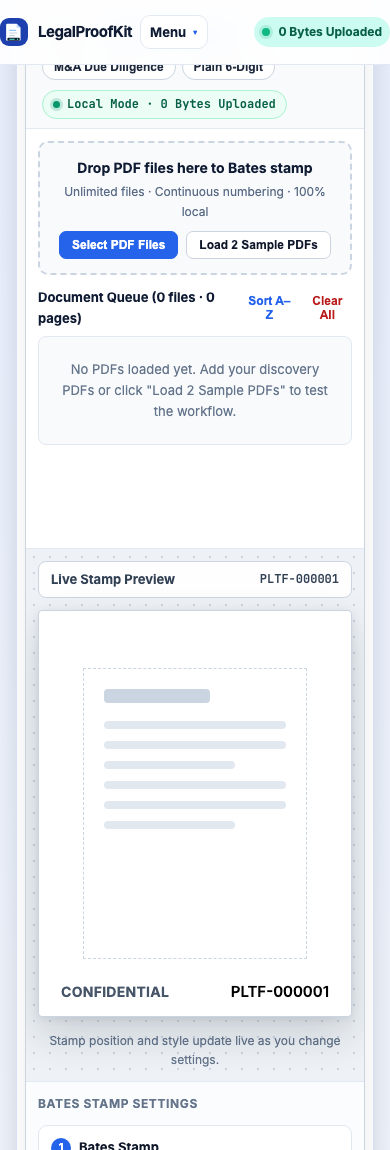
iPhone Safari vs. Android Chrome
| Feature | iPhone Safari | Android Chrome |
|---|---|---|
| Open the tool online | Yes | Yes |
| Select a PDF from device storage | Yes (Files) | Yes (Downloads / Files) |
| Add sequential Bates numbers | Yes | Yes |
| Customise prefix and digits | Yes | Yes |
| Download the stamped PDF | Yes | Yes |
| Install an app | Not required | Not required |
| Batch processing | Supported; memory-dependent | Supported; memory-dependent |
What to watch for on a small screen
- Large PDFs take longer. Processing happens in browser memory, so a phone with less free RAM will be slower than a laptop.
- Keep originals untouched. Export a stamped copy; do not overwrite the source document.
- Use Wi-Fi for big files. You only load the page once, but a stable connection helps the first load.
- Check the preview before export. On a narrow screen, zoom the preview to confirm the stamp clears existing text.
- Prefer local processing. "No installation" does not mean "no upload" — verify the tool processes files in-browser.
Working with privileged documents on a phone
For attorney-client communications, sealed filings or personal data, follow your firm's device policy as well as the tool's privacy behaviour. LegalProofKit keeps PDFs in browser memory and never uploads them, but the device itself still needs to be an approved one. See the offline no-upload test to verify the behaviour yourself.
Frequently Asked Questions
Can I Bates stamp PDFs on an iPhone or Android phone?
Yes. Open LegalProofKit in Safari on iPhone or Chrome on Android, choose PDFs from Files or Downloads, set your Bates prefix and starting number, then stamp and download. No separate app or desktop computer is required.
Do I need to install an app to Bates stamp on mobile?
No. LegalProofKit is a browser tool — it runs in Chrome, Safari, Firefox and Edge on both mobile and desktop. There is nothing to install and no account to create.
Are my PDFs uploaded when I stamp on my phone?
No. LegalProofKit processes files in browser memory on your device. To confirm, load the page, switch to airplane mode, then complete a stamping job — the download still works because nothing was sent to a server.
Does batch stamping work on mobile browsers?
You can queue multiple PDFs and stamp them in one continuous sequence on mobile. Very large productions may be slower on a phone because processing uses the device's memory; for hundreds of megabytes, split the job into batches and continue with the Start Number field.
Will Bates numbers cover text on a scanned PDF on a small screen?
Keep Shrink-to-fit margins (92%) enabled — it scales page content inward and centres it so the stamp lands in clean white margin space. Check the live preview before exporting.
Ready to Bates stamp confidential PDFs locally with zero uploads?
Open the Free Bates Stamp Tool