
Bates Numbering Shrink-to-Fit Margins — 92% Scaling Guide
Scale dense scans to 92% with centered white margins so Bates stamps never cover footer text while keeping US Letter and A4 page sizes intact.
How 92% Shrink-to-Fit Margin Geometry Protects Dense Scans
Scanned contracts, hospital statements, spreadsheet printouts, and faxed invoices routinely push text, page numbers, or dollar totals within 0.25 inches of the paper edge. Stamping directly over the original layer obscures critical footer data. Smart Shrink-to-Fit Margins (enabled by default when you open the tool) solves this mathematically without altering your document's paper size.
- Exact Paper Dimensions Preserved: A US Letter (
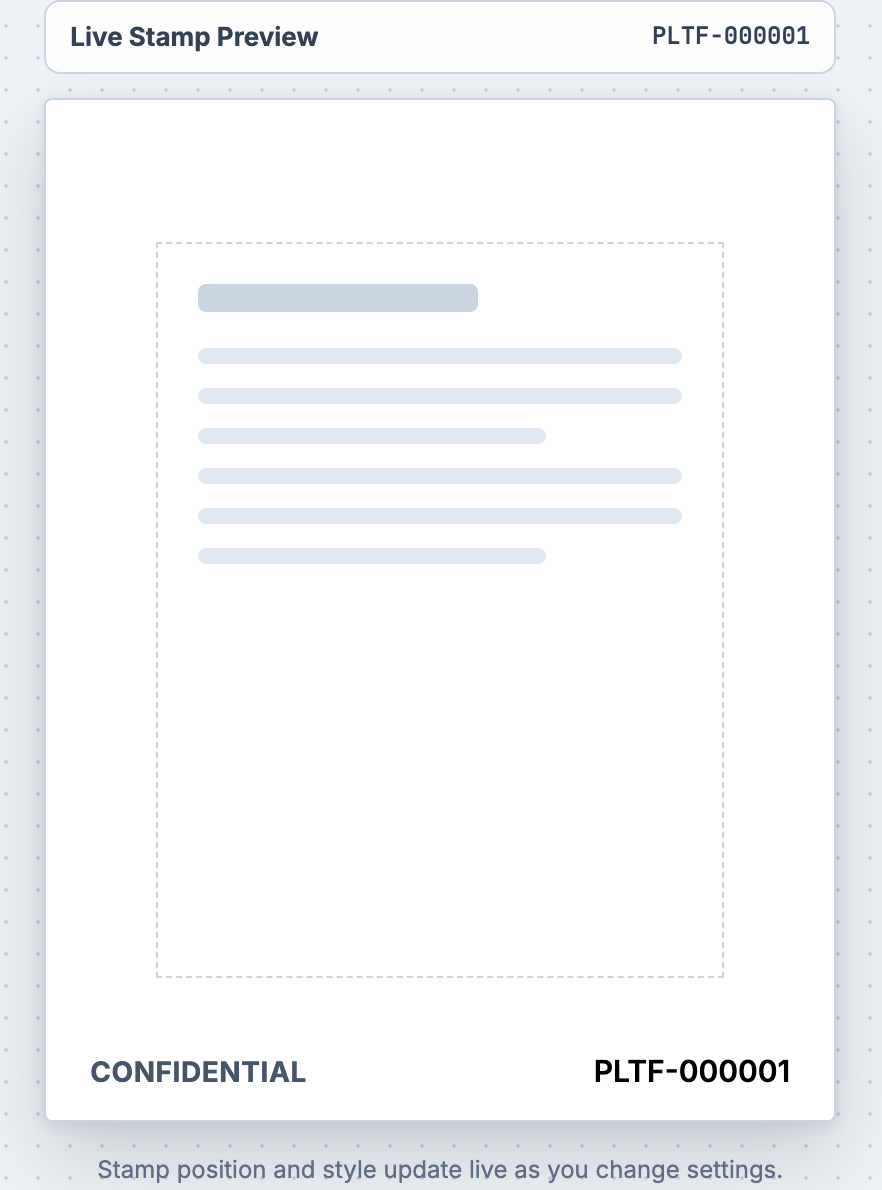
8.5 × 11 in) or A4 (210 × 297 mm) source page stays the exact same physical size in the output PDF—preventing e-filing rejection or printer scaling warnings. - Centered 92% Content Scaling: Each page's visual layer is scaled proportionally to 92% and centered symmetrically inside the original frame, creating a uniform 4% white safety border around all four edges.
- Guaranteed Clear Stamp Zones: Both the Bates number (bottom right by default) and any opposite-corner confidentiality label (
CONFIDENTIALorATTORNEYS' EYES ONLY) render strictly inside that white border.
When to Keep Shrink-to-Fit ON vs. When to Turn It OFF
| Document Type | Recommended Setting | Why |
|---|---|---|
| Scanned contracts, faxes & wet-ink signatures | ON (92% Shrink) | Signature dates and fax headers frequently sit near the bottom edge. |
| Medical bills, EOBs & financial spreadsheets | ON (92% Shrink) | Prevents Bates stamps from covering bottom-line dollar totals or CPT codes—see insurance claims. |
| Redacted legacy public records | ON (92% Shrink) | Keeps stamps cleanly outside edge-to-edge scans and redaction boxes—see public records & FOIA. |
| Court-filed pleadings with 1-inch margins | OFF (100% Scale) | Freshly drafted briefs already have ample white space and may require strict 100% font-size fidelity under local court rules. |
| Architectural drawings / scaled plans | OFF (100% Scale) | Preserves exact physical drawing scale ratios where 92% reduction would distort printed measurements. |
Ready to preview the margin placement on your documents? Open the tool and toggle Smart Shrink-to-Fit Margins to inspect the live placement stage before exporting your batch.
Frequently Asked Questions
How much white margin does 92% shrink-to-fit create?
Each source page is scaled proportionally to 92% and centered inside its original physical dimensions (such as US Letter or A4), opening a uniform 4% white safety margin on all four sides for Bates and confidentiality stamps.
Does shrink-to-fit alter US Letter or A4 page dimensions?
No. The physical page dimensions (Letter, Legal, A4, or landscape) remain identical to the source PDF; only the inner content layer is scaled to 92% so e-filing portals and office printers require no adjustment.
When should I turn Smart Shrink-to-Fit Margins off?
Turn it off for freshly drafted court pleadings that already have 1-inch margins (where local rules require exact 12-pt body text scale) or for scaled engineering and architectural drawings where physical dimensions must stay at 100%.
Does shrink-to-fit work on PDFs that mix portrait and landscape pages?
Yes. Because each page is embedded and centered according to its own individual width and height, mixed portrait and landscape pages in the same PDF each receive proportional 92% margin protection.
Ready to Bates stamp confidential PDFs locally with zero uploads?
Open the Free Bates Stamp Tool